
Ask Gemini in Google Meet vs Hintly
Last updated: October 23, 2026
Short answer: no, Gemini in Google Meet isn't free for personal Google accounts. Ask Gemini in Meet comes with eligible paid Google Workspace plans, and "Take notes for me" also comes with the Google AI Pro and Ultra subscriptions. The two tools also work differently: Ask Gemini answers when you ask, and Hintly explains terms, names and acronyms on its own as they come up.
Disclosure: this page is published by Hintly. Details about other tools come from their own store listings, websites and help pages, checked in October 2026.
Is Gemini in Google Meet free?
Not on a free personal Google account. When people say "Gemini in Meet" they usually mean one of two features, and Google includes them in different plans:
- Take notes for me writes meeting notes and next steps into a Google Doc.
- Ask Gemini in Meet answers questions you ask during the call.
Here's who gets what, according to Google's Gemini feature comparison:
| Plan | Take notes for me | Ask Gemini in Meet | Live captions |
|---|---|---|---|
| Free personal Google account | No | No | Yes |
| Google AI Plus | No | No | Yes |
| Google AI Pro and Google AI Ultra | Yes, for meetings you host | No | Yes |
| Workspace Business Starter and Enterprise Starter | No | No | Yes |
| Workspace Business Standard and Business Plus | Yes | Yes | Yes |
| Workspace Enterprise Standard and Enterprise Plus | Yes | Yes | Yes |
| Workspace Frontline Plus | Yes | No | Yes |
| Workspace for Education with the Google AI Pro for Education add-on | Yes | Yes | Yes |
| Education Fundamentals, Standard or Plus without that add-on | No | No | Yes |
Sources: Google's Gemini feature comparison, Education editions comparison, Workspace pricing page, Take notes for me announcement and live captions help page. Checked October 23, 2026. Plans change often, so check Google's page before you buy.
A few details the table can't show:
- Google AI Pro and Ultra notes are for meetings you host. Google added Take notes for me to these personal plans on June 29, 2026, "for meetings that you host".
- Ask Gemini also depends on the meeting. Google's troubleshooting list says it may not be available if the meeting organizer's Workspace edition doesn't include it, if your admin or the host has turned it off, if your Smart features are off, or if you're the only one in the call.
- Some Gemini is free, just not in Meet. In the US, personal accounts get a few Gemini in Gmail features at no charge, such as Help me write.
What a free Google account gets in Meet
A free account still gets two built-in helpers:
- Live captions. All users can turn on captions in dozens of languages. They're shown only to you.
- Picture-in-picture. In Chrome on a computer, Meet can shrink into a floating window when you switch tabs, on personal accounts too. See how to use Google Meet picture-in-picture.
Hintly builds on both: it reads Meet's live captions to decide what to explain, and its cards show up in the floating window. It works on any Google account, and the first 60 minutes of call time are free.
What Ask Gemini does in a call
Ask Gemini in Meet launched in September 2025. In January 2026 Google expanded it to Business Standard, added seven more languages and brought it to the Meet mobile app. On its help page, Google describes it as a way to "privately catch up on what you missed, ask questions about the discussion, and get key takeaways in an active meeting."
According to Google's Ask Gemini help page, you can use it to:
- Summarize the discussion so far, or get a recap of what someone said
- List key takeaways, decisions and action items
- Catch up on what you missed if you joined late, as long as Take notes for me was already on
- Ask your own questions, with answers drawn from the meeting captions, Workspace files you can access (Docs, Sheets, Slides, Gmail, Calendar and more) and Google Search and public websites
For anyone whose plan includes it, it's a capable assistant built right into Meet, and it can look things up on the web when you ask.
How to use Ask Gemini in Google Meet
- Join a meeting on a plan that includes it. Ask Gemini starts on its own once two participants have joined, or the host can turn it on.
- On a computer, click the Ask Gemini text box at the bottom left of the meeting. Google moved it there in May 2026; before that it sat behind an icon at the top right.
- Type a question, or pick one of the suggested questions. Click the Ask Gemini icon for more suggestions.
- In the Meet app, tap More controls on Android or Menu on iPhone and iPad, then tap Ask Gemini.
Good to know before you use it
- Your questions are private. Prompts and answers are visible only to you, and they're saved in your Conversation History.
- Everyone is told it's on. All participants see a consent banner when Ask Gemini is enabled, and people who dial in hear an announcement.
- Admins and hosts can switch it off. It's on by default. Admins can turn it off for a domain, organizational unit or group, and hosts and co-hosts can turn it off for everyone from the Calendar event or Host controls.
- Eight languages, one at a time. English, French, German, Italian, Japanese, Korean, Portuguese and Spanish, with one language per meeting.
- No recording. It doesn't record the meeting or keep caption data after it ends.
- A few limits. It isn't available in breakout rooms, and it can't answer about what was said before you joined unless Take notes for me was already on. Google notes it can make mistakes, including about people.
What Hintly does in a call
Hintly is a Chrome extension for Google Meet in desktop Chrome. It adds a toggle beside Meet's Leave call button, on by default once you sign in. While it's off, it requests nothing and no caption text leaves the browser.
When you switch it on, Hintly reads the call's live captions (even when captions are hidden on your screen) and shows small cards near the top of the Meet tab, a moment after the words are spoken. You don't type anything. The cards cover:
- Hints: a term and a short explanation (hover to expand), for jargon, acronyms, industry terms, concepts, niche products and companies, notable people, and lesser-known places and events.
- Names for things described: when someone says "that yellow app with the ghost", Hintly names it (Snapchat).
- Fact checks: when someone gets a fact clearly wrong, like a wrong year, it shows the right answer.
- Who's who: people, projects and clients mentioned earlier come back as a reminder when they're mentioned again. This memory is cleared when the call ends.
- For you: when someone asks you to do something, it shows the ask.
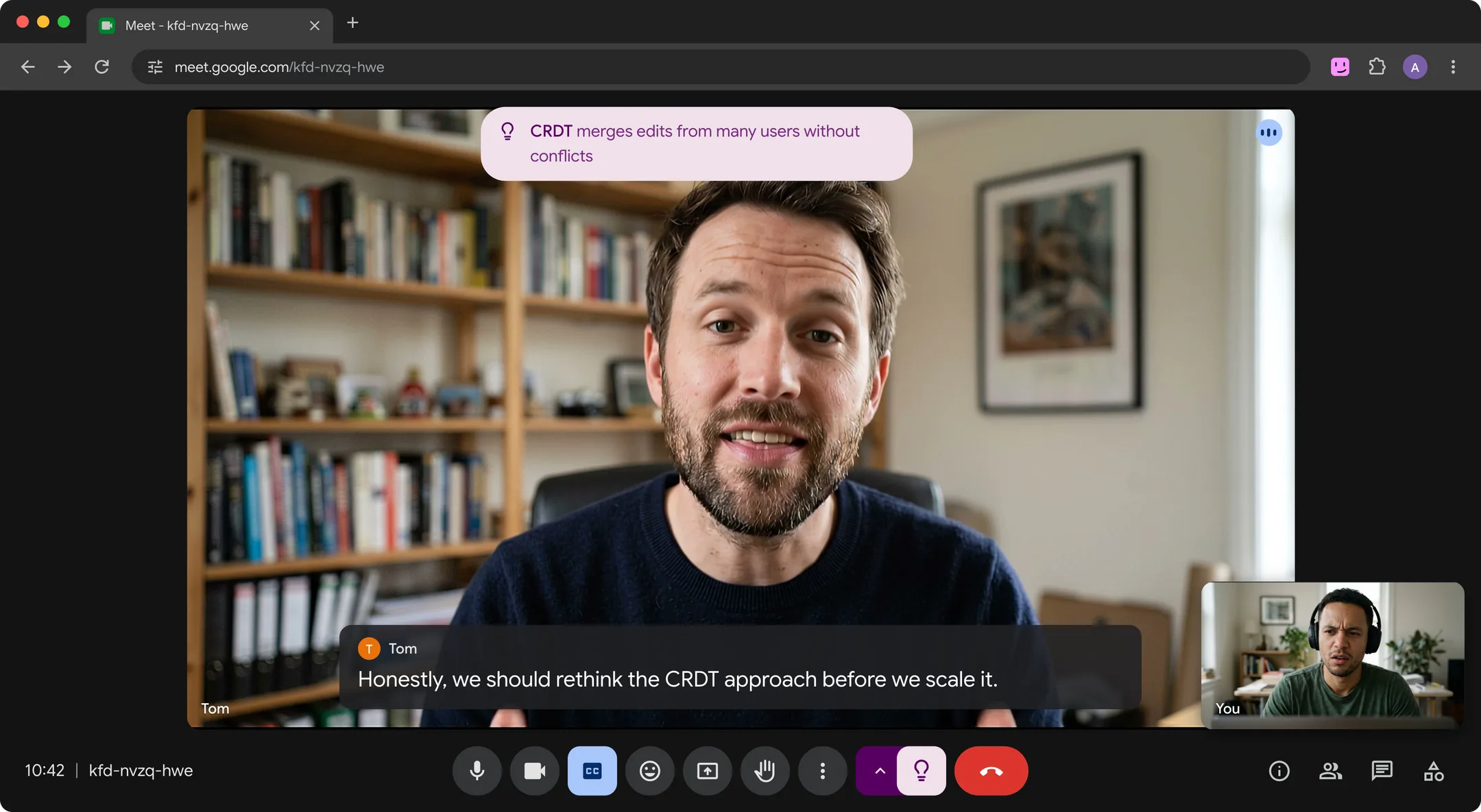
Hintly skips what nearly every adult already knows, like Excel, Slack or Q3, and doesn't guess internal codenames unless the call explains them. More in understanding jargon in meetings and keeping up with acronyms at work.
- The cards appear only on your screen. No bot, no recording, and Hintly's server doesn't store what's said, though caption text is sent to it and to AI models to write hints.
- Cards follow you into Meet's picture-in-picture window when you switch tabs.
- Built for English calls, with no translation.
- No notes. It doesn't write summaries, transcripts or action-item recaps.
- AI can be wrong. Treat hints as a quick pointer.
- Price. Sign in with Google. The first 60 minutes of call time are free, no card needed. Pro is $12 a month for 50 hours.
Side by side
| Ask Gemini in Meet | Hintly | |
|---|---|---|
| How you use it | Type a question or pick a suggested one | Hints appear on their own as things come up |
| Who sees it | Only you see your questions and answers. Everyone sees a banner that Ask Gemini is on. | The cards appear only on your screen, so sharing your entire screen shows them too. No bot joins the call. |
| Account needed | Eligible paid Workspace plan: Business Standard or Plus, Enterprise Standard or Plus, or Google AI Pro for Education | Any Google account |
| Platforms | Meet on a computer, plus the Meet app on Android, iPhone and iPad | Google Meet in desktop Chrome (116 or later) |
| Languages | English, French, German, Italian, Japanese, Korean, Portuguese and Spanish, one per meeting | Built for English calls |
| Notes and recaps | Summaries, decisions and action items when you ask. Full notes through Take notes for me. | No notes, summaries or transcripts |
| Explains terms and names | Yes, when you ask. Answers can draw on Google Search and your Workspace files. | Yes, on its own, a moment after they're said |
| Remembers people mentioned earlier | Can recap what someone said earlier in the meeting when you ask | Reminds you who someone is when they come up again, for that call only |
| Works in picture-in-picture | Not on Google's list of features that work in picture-in-picture | Yes, cards appear in Meet's floating window |
| Price | Included with eligible paid plans | First 60 minutes free, then Pro at $12 a month for 50 hours |
Which should you use?
Use Ask Gemini if your plan includes it and you want recaps, catch-ups, decisions and action items, or full notes through Take notes for me. It's also the better fit for calls in languages other than English, for the Meet mobile app, and for questions that need your Docs, Gmail or Calendar.
Use Hintly if you want explanations without stopping to type, so you can keep listening. It works on any Google account, including personal Gmail and Workspace plans without Gemini in Meet, and adds fact checks and who's who reminders.
Use both if your plan has Ask Gemini. They do different jobs in the same call: Hintly explains terms and names as they come up, and Ask Gemini handles "catch me up" and "what was decided?" when you ask.
For notes on Zoom or Teams, or help in person, see Google Meet AI assistants, real-time AI meeting assistants and Google Meet Chrome extensions. For translation, Meet's translated captions come with eligible paid plans.
FAQ
Is Gemini in Google Meet free?
No. A free personal Google account doesn't include Take notes for me or Ask Gemini in Meet. Take notes for me comes with Google AI Pro and Ultra (for meetings you host) and with eligible Workspace plans from Business Standard up. Ask Gemini in Meet comes with Workspace Business Standard, Business Plus, Enterprise Standard and Enterprise Plus, and the Google AI Pro for Education add-on. Live captions are free for everyone.
Can I use Ask Gemini on a personal Gmail account?
Not through a personal plan. Google's help page says Ask Gemini requires an eligible Google Workspace subscription, and its comparison of Google AI plans doesn't list it for Plus, Pro or Ultra. Google AI Pro and Ultra do include Take notes for me. Hintly works on any Google account in desktop Chrome.
Can Ask Gemini explain a term during a call?
Yes, if you type the question. Ask Gemini can draw on the meeting captions, your Workspace files and Google Search, so "what does CRDT mean?" is a fair thing to ask. The difference is timing: Ask Gemini answers when you ask, and Hintly explains terms on its own as they come up, so you don't have to stop and type mid-conversation.
Do other people know when I use Ask Gemini or Hintly?
With Ask Gemini, everyone in the meeting sees a consent banner when it's enabled and dial-in participants hear an announcement, though your questions and answers stay private to you. With Hintly, no bot joins and the cards are only on your screen. If you share your entire screen, or a window showing Meet, others see the cards too. Either way, an AI is processing what other people say, so check your organization's policy before using it on work calls.