
How to keep up with acronyms at work
Last updated: October 23, 2026
Every workplace has its own shorthand. In your first weeks at a new job, it can feel like everyone else was handed a dictionary you never got.
The acronyms that matter for your role are a shorter list than it seems, and most of them repeat every day. This guide sets out a plan for your first month, a table of acronyms you're likely to hear on calls, and how to handle the internal ones you can't search for. It's published by Hintly, a Chrome extension for Google Meet, which comes up near the end along with its limits.
Why workplaces pile up acronyms
Acronyms save time for the people who use them daily. Saying "NRR" fifty times a week is easier than "net revenue retention". The trouble is that this shorthand builds up over years, mixes with industry terms and team nicknames, and rarely gets written down. By the time you join, it all sounds like common knowledge.
Plenty of people find it too much. In a 2023 LinkedIn and Duolingo survey of more than 8,000 professionals, 58% felt their coworkers overuse jargon.
Fields built around metrics and documents, like finance, sales, software and marketing, tend to have the most. Larger companies add their own layer on top: names for teams, tools, processes and projects.
A plan for your first month
You don't need to memorize a list. You need a habit that catches each new term once, so the second time you hear it, you already know it.
Week 1: start a personal glossary
Make one note, in whatever app you already use, and add every unfamiliar term the moment you hear it. Three fields are enough: the term, what it means, and where you heard it. Don't wait until you know the meaning. Write the term down now and fill in the rest later.
Week 1: ask for the team glossary
Many teams have one tucked away in a wiki, an onboarding doc or a pinned message. Ask your manager or onboarding buddy early: "Is there a list of team terms anywhere?" If there isn't, your personal notes are the start of one.
Weeks 1 and 2: read old docs and threads
Recent planning docs, project briefs and the busiest Slack or Google Chat channels are full of the terms people actually use. Reading them is lower pressure than a live call: you can stop, search and add to your glossary without missing anything. Notice which acronyms show up again and again. Those are the ones to learn first.
Every week: pair each acronym with a sentence
A definition on its own is easy to forget. The sentence you heard it in is what makes it stick, because it shows how your team uses the term:
- CAC: customer acquisition cost. "Paid search is pushing CAC up this quarter."
- PRD: product requirements document. "Can you get the PRD to design by Thursday?"
When an acronym has several meanings, the sentence is also how you know which one applies.
Weeks 2 to 4: batch questions for a buddy
Pick one or two colleagues who don't mind questions, often your onboarding buddy or a peer in the same role. Rather than asking about each term as it comes up, send a short batch once a day or once a week: "Three from today: what's Halo, what goes in the ops review, and is DSO something I should track?" Batching respects their time, and they'll often add context a definition wouldn't give you.
For what to do when a term catches you out in the middle of a call, see how to understand jargon in meetings.
Acronyms you might hear on calls
These are examples from common fields, the kind that come up on calls and aren't obvious from context. Your company will have its own set, but if you work in or near any of these areas, they're a good place to start.
| Field | Term | What it means |
|---|---|---|
| SaaS and sales | ARR | Annual recurring revenue: the yearly value of all active subscriptions |
| SaaS and sales | NRR | Net revenue retention: revenue kept from existing customers after upgrades, downgrades and cancellations |
| SaaS and sales | CAC | Customer acquisition cost: the average sales and marketing spend to win one new customer |
| SaaS and sales | ICP | Ideal customer profile: the type of company that's the best fit for what you sell |
| Startups and VC | TAM | Total addressable market: the total revenue available if you won every possible customer |
| Startups and VC | SAFE | Simple agreement for future equity: an early investment that turns into shares at a later priced round |
| Startups and VC | Pro rata | An investor's right to put money into later rounds to keep the same ownership percentage |
| Product and engineering | PRD | Product requirements document: what a feature should do, who it's for and why |
| Product and engineering | CRDT | Conflict-free replicated data type: data that can be edited in separate copies and merged without conflicts |
| Product and engineering | SLO | Service level objective: an internal reliability target, such as 99.9% of requests succeeding |
| Finance | EBITDA | Earnings before interest, taxes, depreciation and amortization: a rough measure of operating profit |
| Finance | DSO | Days sales outstanding: the average number of days customers take to pay after a sale |
| Marketing | MQL | Marketing qualified lead: a lead that marketing judges ready to pass to sales |
| Marketing | ROAS | Return on ad spend: revenue earned for each dollar spent on ads |
| Marketing | CPM | Cost per mille: the price of 1,000 ad impressions |
| Consulting | MECE | Mutually exclusive, collectively exhaustive: splitting a problem into parts that don't overlap and together cover everything |
| HR | RIF | Reduction in force: a layoff, usually for business reasons rather than performance |
The same letters can mean different things in different fields. ICP is an ideal customer profile in a sales meeting, but intracranial pressure in a hospital. The sentence you noted settles which one you heard.
Industry acronyms vs internal ones
Everything in the table is industry vocabulary: it means roughly the same thing at every company, and a search will find it. Internal acronyms are a different problem. A team might call its weekly planning call "the WPS" or name a project after a bird, and none of that is online.
- Industry acronyms: search the term with a word from the context, such as "DSO finance", check it fits the sentence you heard, and add it to your glossary.
- Internal acronyms: check the team glossary first, then ask a person. Search engines and AI tools don't know what your team decided to call things, and they'll still offer an answer.
Once you've learned the internal ones, add them to the team glossary, or start one if it doesn't exist. The next person to join gets a head start, and it's a useful thing to have contributed in your first month.
Catch acronyms live on Google Meet calls
Hintly is the Chrome extension this site is for. Switch it on from the toggle beside Meet's Leave call button and it reads the call's live captions. When an acronym or industry term comes up, a small card appears near the top of the Meet tab a moment later with what it stands for and a short explanation. That makes it a quick way to fill in your glossary as you go.
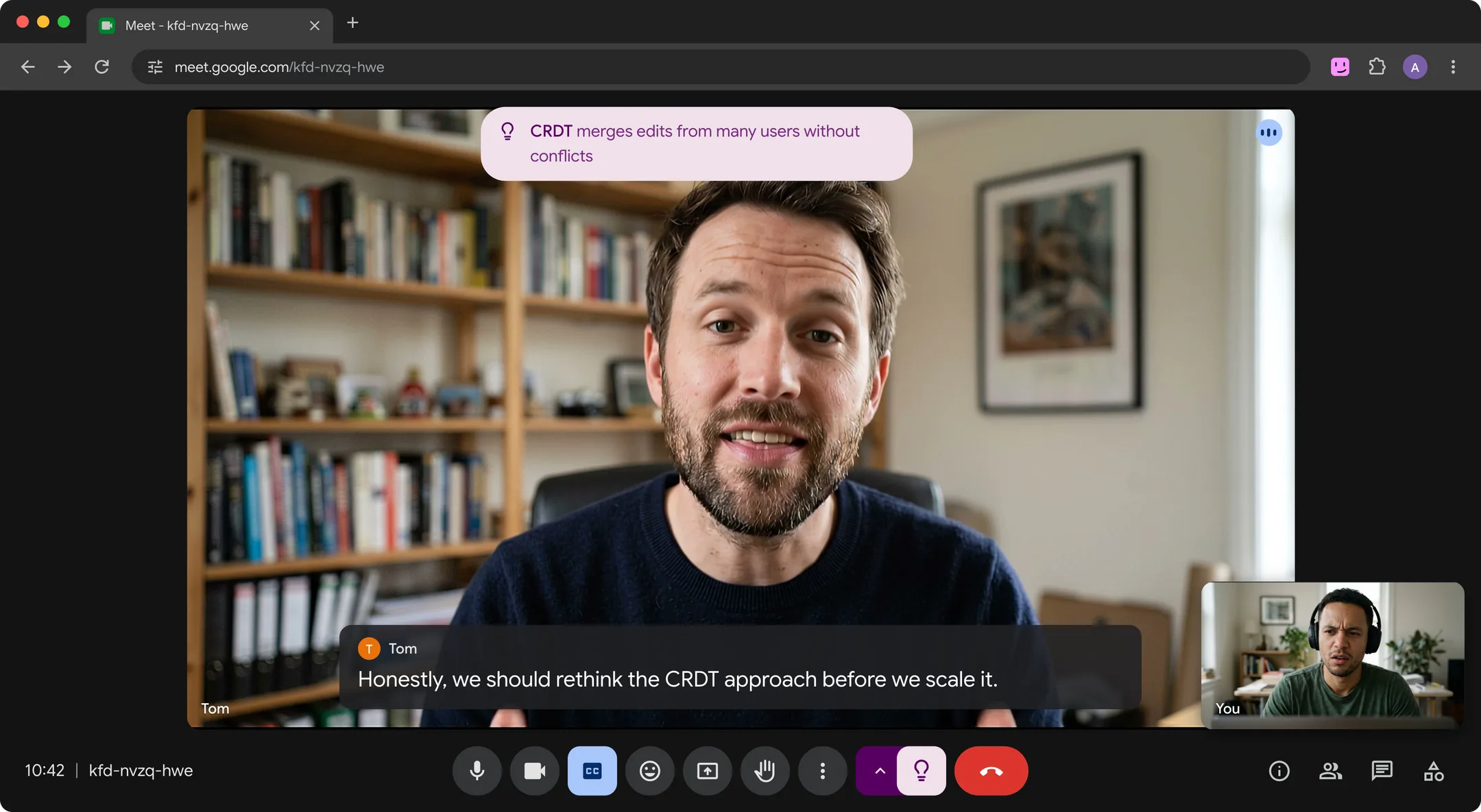
It also reminds you who people, projects and clients are when they come up again later in the same call, which helps while you're still learning names. That memory lasts for the call only. The cards appear only on your screen (sharing your entire screen, or a window showing Meet, shows them too), no bot joins, and nothing is recorded.
What it won't do:
- Work outside Google Meet. It runs in desktop Chrome on Meet calls only, so Zoom, Teams and Slack messages aren't covered.
- Translate. It's built for calls in English.
- Explain the basics. It skips terms nearly every adult knows, like Q3, PR or API, so not every acronym gets a card.
- Know your internal acronyms. Codenames and team shorthand stay unexplained unless someone on the call spells them out. That's still the team glossary's job.
- Always be right. Hints are written by AI and can be wrong, so check anything you're about to act on.
Caption text is sent to Hintly's server and AI models to write the hints, and the server doesn't store it. Check your organization's policy on AI tools before using it on work calls.
Common questions
Why do companies use so many acronyms?
Mostly to save time. Teams that discuss the same metrics, documents and projects every day shorten them, and the short forms spread. Over time they also become a sign of belonging, which is part of why they can feel exclusionary to newcomers. Few teams write them down, so each new hire learns them from scratch.
How long does it take to learn a company's jargon?
There's no fixed answer, but the core vocabulary usually settles within your first month or two if you capture terms as you go. Industry terms come quickly because they repeat. Internal names take longer because there are more of them and they change as projects start and end. A personal glossary speeds this up, because you only look each term up once.
Is there a tool that explains acronyms during calls?
On Google Meet in desktop Chrome, Hintly shows a short explanation of acronyms and industry terms a moment after they're said, on your screen only. Your first 60 minutes of call time are free, then Pro is $12 a month for 50 hours of calls. It doesn't cover Zoom or Teams, and it won't know internal company terms unless the call explains them. For other live options, see real-time AI meeting assistants.