
Can you use Copilot in Google Meet?
Last updated: October 23, 2026
Short answer: no. Microsoft Copilot's meeting features are built into Microsoft Teams meetings, and Microsoft says Copilot won't work even in Teams meetings hosted outside your own organization. A Google Meet call has no Copilot button. In Meet, use Gemini if your Google plan includes it, a note taker like Tactiq or Fellow for transcripts, or Hintly for live explanations of terms and names.
Disclosure: this page is published by Hintly. Details about other tools come from their own store listings, websites and help pages, checked in October 2026.
What Copilot does in Teams meetings
Copilot in Teams is good at its job. According to Microsoft's help page, it "summarizes key discussion points, including who spoke and what they said. It also suggests action items and answers any questions you have, in real time during or after a meeting." You open it from the meeting controls and chat with it privately, with prompts like "What questions can I ask to move the meeting forward?"
A few things decide whether you get it:
- A license. Microsoft's admin documentation lists "an add-on Microsoft Copilot license" as the prerequisite. Each licensed participant can ask questions that only they see.
- The organizer's setting. In the meeting options, under Copilot and other AI, the organizer picks a value for Allow Copilot and Facilitator.
- Your admin's policy. Admins set the default, and under the default policy organizers can't change it.
The three values work like this:
- During and after the meeting: transcription is required. Copilot starts once someone starts transcribing, and you can keep asking about the meeting afterward.
- Only during the meeting: Copilot works from temporary speech-to-text data, which is gone once the meeting ends.
- Off: Copilot, recording and transcription are off for the meeting. Copilot in the meeting chat still works, using only what's in the chat.
Why Copilot doesn't work in Google Meet
Copilot's meeting features live inside the Teams meeting window and run on the Teams meeting's own speech-to-text and transcript. A Google Meet call runs on Google's service, so there's no Teams meeting for Copilot to attach to. Microsoft's Copilot meeting docs cover Teams meetings, events and calls, and don't mention Google Meet.
Microsoft draws the line even tighter than "Teams only". Its help page says: "Copilot won't work in meetings that are hosted outside the participant's organization." If another company's Teams meeting doesn't get Copilot, a Meet call won't either, even if you have a Copilot license.
You can still type a question into Copilot Chat in another tab, like any chatbot. It just isn't part of the call, so you have to stop listening to type. The same goes for ChatGPT in Google Meet.
What to use in Google Meet instead
The right replacement depends on what you wanted Copilot for.
Questions and notes built into Meet: Gemini
Google's equivalent of Copilot in Meet is Gemini. Ask Gemini in Meet answers questions you type during the call, like catching up on what you missed or listing decisions and action items, and it can draw on the meeting captions, your Workspace files and Google Search. Take notes for me writes notes and next steps into a Google Doc. Everyone in the meeting sees a banner when Ask Gemini is on.
Both need the right plan. Ask Gemini comes with eligible paid Google Workspace plans, and Take notes for me also comes with the Google AI Pro and Ultra subscriptions, for meetings you host. Free personal accounts get neither. The full plan breakdown is in Ask Gemini in Google Meet vs Hintly.
Notes and transcripts: Tactiq, Mixmax or Fellow
- Tactiq is a Chrome extension that writes a live transcript of Google Meet, Zoom and Teams calls in your browser. No bot joins the call. When the call ends, it writes a summary, action items and key takeaways. It's free to start.
- Mixmax Meeting Copilot is a Mixmax product, not Microsoft's, despite the name. It "joins your calls as an attendee" on Google Meet or Zoom, someone has to admit it, and once the meeting ends it emails you a summary with key points and next steps. It's English only and comes with paid Mixmax plans.
- Fellow's AI Note Taker joins Zoom, Google Meet or Teams calls to record, transcribe and summarize, once a participant admits it. Fellow's desktop app for Mac and Windows can also record without a bot. The free plan is limited to five AI notes per user in total.
For more note takers, see Google Meet AI assistants.
Live explanations without a bot: Hintly
If you wanted help keeping up while people talk, such as an acronym you don't know, a name you can't place or a claim that sounds off, Hintly does that in Meet. It's a Chrome extension for Google Meet in desktop Chrome. Turn it on with the toggle beside the Leave call button, and it reads the call's live captions and shows small cards near the top of the Meet tab, a moment after the words are spoken. You don't type anything.
- Hints: a term and a short explanation, for jargon, acronyms, industry terms, niche products and companies, notable people, and lesser-known places and events.
- Names for things described: when someone says "that yellow app with the ghost", Hintly names it (Snapchat).
- Fact checks: when someone gets a fact clearly wrong, like a wrong year, it shows the right answer.
- Who's who: people, projects and clients mentioned earlier in the call come back as a reminder. This memory is cleared when the call ends.
- For you: when someone asks you to do something, it shows the ask.
When Marcus says "Let's lock the OKRs before the QBR on Friday", a card reads: QBR, quarterly business review.
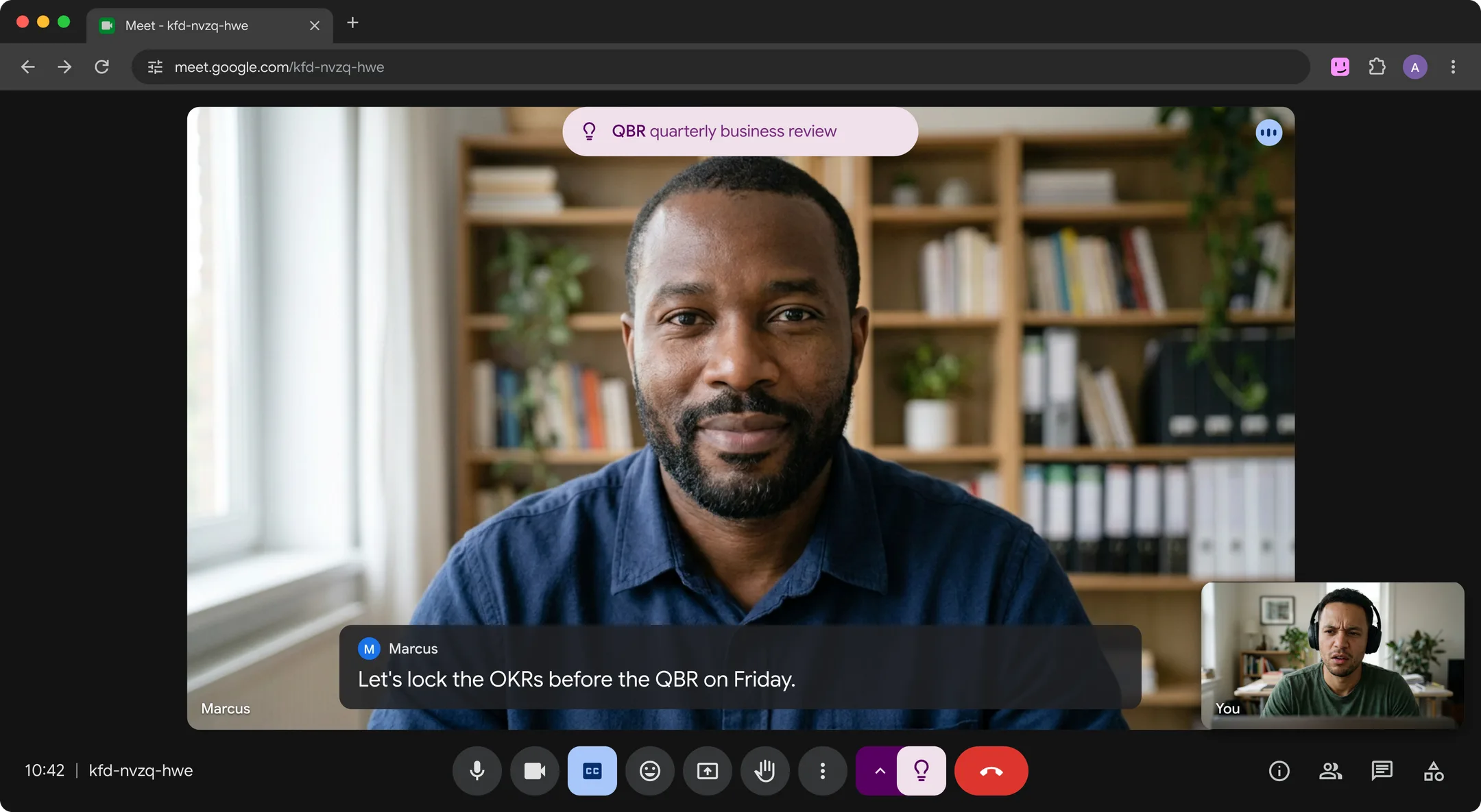
Hintly skips what nearly everyone knows, like Excel or Q3. More in understanding jargon in meetings and keeping up with acronyms at work.
- The cards appear only on your screen. No bot, no recording, and Hintly's server doesn't store what's said, though caption text is sent to it and to AI models to write hints.
- No notes. It doesn't take questions or write summaries or transcripts, so pair it with a note taker if you need those.
- Cards follow you into Meet's picture-in-picture window when you switch tabs.
- Built for English calls, with no translation. Hints are written by AI and can be wrong.
- Price. Sign in with Google. The first 60 minutes of call time are free, no card needed. Pro is $12 a month for 50 hours.
Copilot and the Meet options side by side
| Tool | Works in | During the call | Joins as a bot? | Account needed |
|---|---|---|---|---|
| Microsoft Copilot in Teams | Teams meetings hosted by your organization | Answers your questions, recaps and suggests action items | No, built into Teams | Add-on Microsoft Copilot license |
| Ask Gemini and Take notes for me | Google Meet | Answers questions you type, and takes notes into a Google Doc | No, built into Meet. Everyone sees a banner when Ask Gemini is on. | Eligible paid Workspace plan. Take notes for me also comes with Google AI Pro and Ultra. |
| Tactiq | Google Meet, Zoom and Teams in Chrome | Live transcript in your browser, summary after | No | Tactiq account, free to start |
| Mixmax Meeting Copilot | Google Meet and Zoom | Transcribes, then emails a summary after | Yes, joins as an attendee someone admits | Paid Mixmax plan |
| Fellow AI Note Taker | Zoom, Google Meet and Teams | Records and transcribes, notes after | Yes, or botless with the desktop app | Fellow account, limited free plan |
| Hintly | Google Meet in desktop Chrome | Explains terms, names and wrong facts as they come up | No | Google account. First 60 minutes free. |
If your company uses Microsoft 365 but a client uses Meet
This is the usual reason people look for Copilot in Meet. A few practical moves:
- Host the call yourself when Copilot matters. A Teams invite from the client doesn't help, since Copilot won't work in meetings hosted outside your organization. Send the invite from your own Teams. Guests can join without a Teams account from Edge or Chrome, though some admin settings require them to verify first.
- On the client's Meet, the client's plan counts. Ask Gemini isn't available if the meeting organizer's Workspace edition doesn't include it, so as a guest you can't bring it along.
- Ask the host for the notes. Meet saves transcripts to the organizer's Google Drive and emails them to the host, co-hosts and whoever started transcribing. As an outside guest, you'll usually need the host to share them.
- Use Copilot after the call. If your organization allows it, upload the transcript or notes to Microsoft 365 Copilot Chat as a Word file or PDF and ask for a summary.
- Ask before you bring a bot. A note taker that joins as an attendee shows up in the client's participant list. Browser tools like Tactiq or Hintly don't join the call, but they still process what the client says, so check your organization's policy first.
FAQ
Can I use Copilot in Google Meet?
No. Microsoft Copilot's meeting features run inside Microsoft Teams meetings, and Microsoft says Copilot won't work even in Teams meetings hosted outside your organization. For help inside Meet, use Gemini, a note taker or Hintly.
Is there a Copilot for Google Meet?
Not from Microsoft. Some third-party tools use the word in their names, such as Mixmax's Meeting Copilot for Google Meet, a note taker that joins as an attendee and emails you a summary. It isn't connected to Microsoft Copilot.
What's Google's version of Copilot in Meet?
Gemini. Ask Gemini in Meet answers questions you type during a call, and Take notes for me writes notes into a Google Doc. Ask Gemini needs an eligible paid Workspace plan, and Take notes for me also comes with Google AI Pro and Ultra. See Ask Gemini vs Hintly for plan details.
Can Copilot summarize a Google Meet recording?
Not by uploading the recording to Copilot Chat. Microsoft's list of file formats supported by Copilot includes documents, spreadsheets and images, but no audio or video. The transcript works instead. Meet saves transcripts as Google Docs, so download it as a Word file and upload that to Copilot Chat, if your organization allows it.