
How to follow engineering meetings as a non-technical product manager
Last updated: October 23, 2026
The engineers are debating whether the migration needs a code freeze, someone mentions p99 latency, and the call moves on to a decision you're supposed to own. You followed the gist, but not enough to push back.
This guide is for product managers who didn't come from engineering: five questions that work in any technical discussion, the engineering terms you'll actually hear in meetings (not the roadmap-and-MVP kind), and how to get more technical without learning to code. This site belongs to Hintly, a Chrome extension for Google Meet, so one section covers what it does and where it falls short.
Plenty of product leaders don't come from engineering
If you came to product from sales, marketing, support or consulting, you're in good company. In the first State of Product Leadership survey by Pendo and Product Collective, run in late 2017 with 300 product management executives and managers, 57% of product leaders had a business background rather than a software development or design one. It's a 2017 snapshot, not today's figure, but it shows a non-engineering route into product is nothing unusual.
Technical enough means following the trade-off
There's no fixed bar. A Reforge write-up on PM technical skills says "There's no one-size-fits-all answer to how technical a PM should be." It adds that advanced coding isn't necessary, but key engineering concepts make you a better partner to engineers.
In practice, working with engineers as a product manager rarely means reading code. It means following the trade-off. Most technical debates come down to options with different costs: faster now but harder to change later, safer but slower. Engineers own how it's built. Your job is to understand what each option costs users and the business, then help choose.
Five questions that open up any technical discussion
These ask about consequences rather than implementation, so they work on any topic and rarely come across as naive.
- "What breaks if this goes ahead?" This surfaces dependencies on other teams, features and customer integrations.
- "Can it be undone?" A change behind a feature flag can be switched off in seconds. A data migration or a public API change can be very hard to reverse.
- "What's the risk, and how would anyone notice?" This checks whether monitoring would catch a problem before customers do.
- "What does it cost in time?" Ask for a range, and what the range depends on.
- "What gets dropped to make room?" Naming it turns a technical debate into a product decision, which is your part of the job.
If you remember only one, make it the second. How reversible a choice is decides how much debate it deserves.
Engineering terms you'll hear, by meeting type
Each term comes with a question that makes it actionable. For a longer list, see the software engineering terms glossary.
Release and shipping meetings
| Term | What it means | What to ask about it |
|---|---|---|
| Deployment (Hintly usually skips this, too common) | Putting a new version of the code live, usually in production. | "Is it deployed and switched on, or only deployed?" |
| PR, pull request (Hintly usually skips this, too common) | A proposed code change that teammates review before it's merged. | "Is it waiting on review, or on changes?" |
| Feature flag | A switch that turns a feature on or off, for some or all users, without changing the code. | "Who can flip it, and when will it be removed?" |
| Rollback | Going back to the previous version after a bad release. | "How fast is a rollback, and could anything block it?" |
| Canary release | Releasing to a small group of users first, then widening as confidence grows. | "Which metric says it's safe to go wider?" |
| Hotfix | An urgent fix shipped outside the normal release cycle. | "Is this a stopgap, and what's the proper fix?" |
| Code freeze | A period, often before a release or a holiday, when code changes stop. | "When does it start, and what counts as an exception?" |
Bug triage and quality reviews
| Term | What it means | What to ask about it |
|---|---|---|
| Regression | Something that used to work broke after a change. | "What caused it, and will a test catch it next time?" |
| Flaky test | An automated test that fails on some runs and passes on others, with no code change. | "Is it slowing releases, and who owns it?" |
| Edge case | An unusual input or situation at the extremes, like an empty list or a huge file. | "How many users hit this, and what happens to them?" |
| Race condition | A bug that depends on which of two things finishes first, so it appears only sometimes and is hard to reproduce. | "What does the user see when it happens?" |
Architecture and design reviews
| Term | What it means | What to ask about it |
|---|---|---|
| API (Hintly usually skips this, too common) | A defined way for one piece of software to talk to another. | "Is it the team's own, or a vendor's?" |
| Latency | The delay between a request and its response. | "Is it slow for everyone, or only some requests?" |
| p99 | The 99th percentile: 99% of requests are at least this fast. It shows the slow tail an average hides. | "What's the p99 now, and what's the target?" |
| Migration | Moving data or systems to a new structure or platform, such as a database schema change. | "Is there downtime, and can it be reversed?" |
| Idempotent | Repeating a request has the same effect as making it once, so a retried payment isn't charged twice. | "What happens if this is retried?" |
| Monolith vs microservices | One app deployed as a single unit, versus many small services deployed independently. | "What gets easier, and what new things can fail?" |
| Caching | Keeping a copy of a result to reuse, instead of fetching or computing it again. | "How out of date can the cached data get?" |
| Rate limit | A cap on how many requests a client can send in a given time. | "Whose limit is it, and what do users see when it's hit?" |
Planning meetings and retros
| Term | What it means | What to ask about it |
|---|---|---|
| Sprint (Hintly usually skips this, too common) | A fixed block of time, one month or less in Scrum, for a planned set of work. | "What would drop to fit this in?" |
| Spike | A time-boxed piece of research to reduce uncertainty, often so the work can be estimated. | "What question will it answer, and by when?" |
| Story points | A relative estimate of effort that factors in complexity and uncertainty. Not hours. | "What's making this one big?" |
| Tech debt | Shortcuts and messy code that make future changes slower, like interest on a loan. | "What does it slow down, and what would fixing it unlock?" |
| Postmortem | A written review of an incident: what happened, why, and the follow-ups. Often blameless. | "Which follow-ups need roadmap time?" |
How to read an estimate or a tech-debt debate
Estimates
An estimate is a forecast, not a promise. "Two weeks" can mean engineering time only, before code review, testing and the release schedule, so ask when users would actually see the change.
- Ask for a range. A wide one means unknowns. Ask what they are, and whether a spike could narrow them.
- Don't turn story points into days. Points are relative and specific to one team.
- Negotiate scope, not the number. "What could ship in half the time?" gets further than pressing the estimate down.
- Ask what would double it. The answer is the risk to watch.
Tech-debt debates
A request to pay down tech debt can sound like pausing product work for something invisible. Translate it into outcomes: what does it slow down, what risk does it carry (outages, security issues, a library nobody can upgrade), and what would fixing it unlock? A concrete answer, like "every billing change takes three times as long as it should", puts it on the roadmap next to features, often in steady slices rather than one big rewrite. If nobody can say what it slows down, it can probably wait.
After the meeting: how to become more technical
Getting more technical as a product manager is mostly reading and asking, a little at a time.
Find an engineer buddy
Ask one engineer for fifteen minutes after big technical meetings. Bring the two or three things you didn't follow and ask about the trade-off, not the implementation.
Read PR descriptions and design docs
A PR description explains what a change does and why, in plain language. Design docs, sometimes called RFCs or tech specs, usually list the options considered and why one won. That alternatives section is a ready-made lesson in the trade-offs your team cares about.
Keep a personal glossary
Note each new term, the sentence you heard it in, and what it means at your company. That last part matters: internal names like "the sync service" won't show up in any search. See how to keep up with acronyms at work for a fuller plan, or how to get up to speed at a new job if you've just joined.
Designers and founders: the same playbook
None of this is specific to PMs. Designers hear about edge cases, latency and rate limits because each becomes a screen state: an empty list, a spinner, an error. Non-technical founders sit through estimates and tech-debt debates, and the five questions work just as well when you decide what gets funded.
Live help in Google Meet
If your engineering meetings run on Google Meet, Hintly, the Chrome extension this site is for, can fill gaps while the discussion is still going. Switch it on beside Meet's Leave call button and it reads the live captions, then shows a small card near the top of the Meet tab a moment after a term comes up. It's built for the tier above the basics: terms like idempotent, p99 or CRDT, plus the tools, libraries, methods and niche vendors engineers mention.
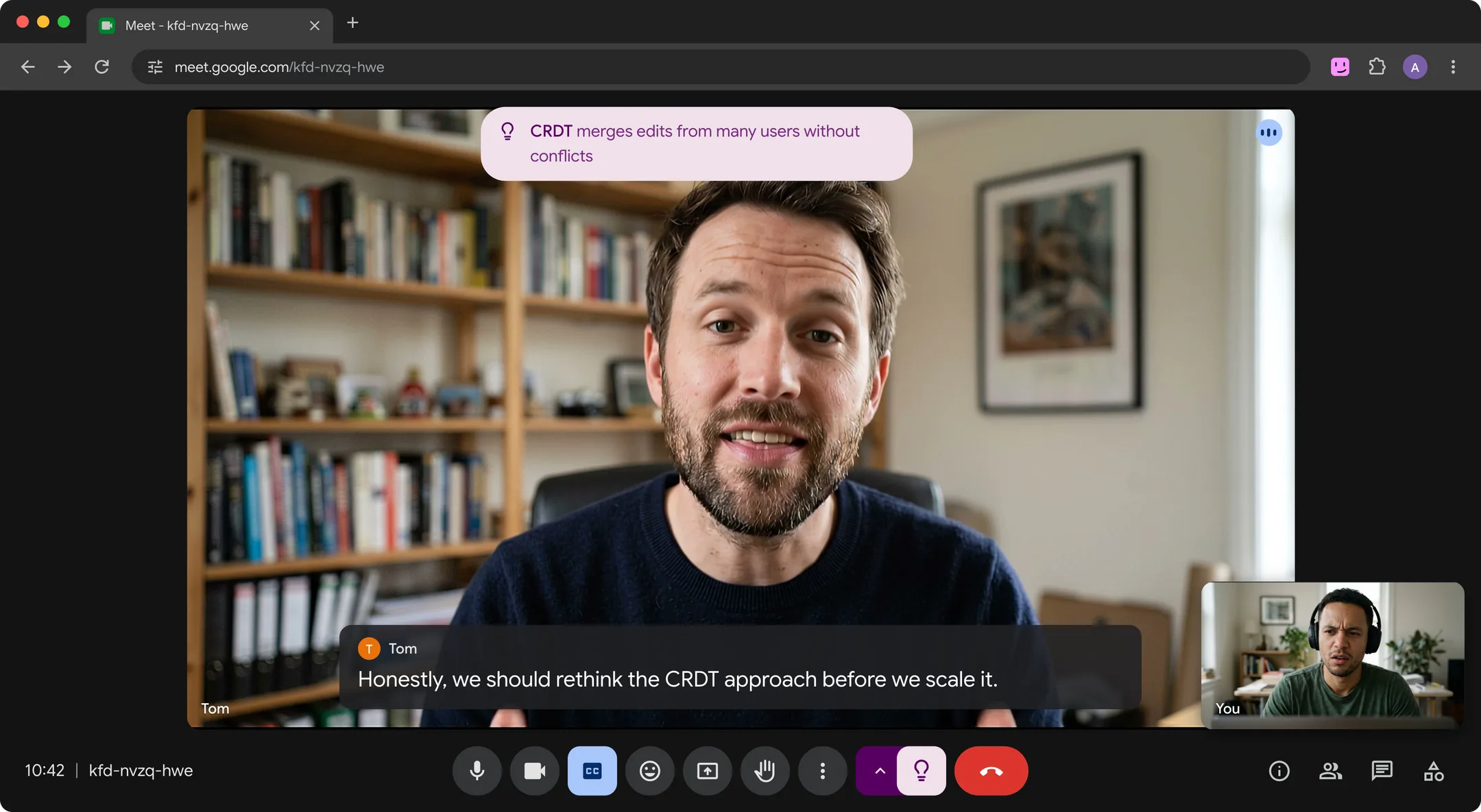
When someone asks you to do something, such as "can you check with legal by Friday?", a For you card shows the ask. Cards also appear in Meet's floating window, so they follow you to other tabs (see how to use Google Meet Picture-in-Picture). The cards appear only on your screen. If you share your entire screen, or a window showing the cards, others can see them too. No bot joins the call, nothing is recorded, and Hintly's server doesn't store what's said.
Where it falls short:
- It skips the basics. API, PR, sprint and deployment usually don't get a card.
- It can't know your internal service names unless someone on the call explains them.
- Google Meet only, in desktop Chrome. Not Zoom, Teams or in-person meetings.
- Built for calls in English. It doesn't translate.
- Hints are written by AI and can be wrong. Confirm anything a decision depends on.
It doesn't take notes or write summaries. For that, see Google Meet AI assistants. To write hints, caption text from the call is sent to Hintly's server and AI models, so check your organization's policy on AI tools before using it on work calls.
FAQ
How technical should a product manager be?
Technical enough to follow the trade-offs behind your product's decisions, which varies by role: a PM on a developer platform needs more depth than one on a consumer app. For most, it means knowing the common terms, asking what each option costs, and roughly understanding how the product fits together. Writing code usually isn't part of the job.
Can a non-technical person be a good PM?
Yes. In the 2017 Pendo and Product Collective survey, more than half of product leaders came from a business background. Understanding users and the business, asking clear questions and admitting what you don't know matter more than a coding background.
What should I do when I don't understand an engineer in a meeting?
Ask early and specifically: "Quick one, what does idempotent mean for this feature?" Or check your understanding: "So a retry can't charge the card twice, is that the point?" If the term isn't central, note it and ask afterwards. For more ways to ask without derailing a call, see how to understand jargon in meetings.