
How to understand native English speakers in meetings
Last updated: October 23, 2026
You can read the docs, write the emails and hold your own in a one-to-one. Then a call starts, two native speakers get going, and you're catching every third word.
That's common, and it's rarely about your level of English. This guide covers what helps on video calls: captions, listening for the right words, polite ways to slow people down, and the meeting idioms you're most likely to hear.
One note up front. This site belongs to Hintly, a Chrome extension for Google Meet that explains terms, names and references in English. It doesn't translate. If you're missing whole sentences rather than the odd word, translated captions or Speech Translation will help you far more than any tip here, or than Hintly.
Why native speakers can be harder to follow
Many people find calls with other non-native speakers easier than calls with native speakers. A few things get in the way:
- Speed. Native speakers rarely slow down unless asked, and they tend to fill every pause.
- Linked words. "Going to" becomes "gonna", "did you" becomes "didja", and the gaps between words disappear.
- Idioms. "That came out of left field" means little if you take it word by word.
- Local references. A TV show, sports team or politician that everyone from one country knows and nobody else does.
- Understatement. In British English, "that's interesting" can be a polite way of saying someone doesn't like an idea.
A 2016 BBC Worklife article put it bluntly: "Native English speakers are the world's worst communicators". Communications trainer Chia Suan Chong told the BBC that native speakers often talk too fast for others to follow and use jokes, slang and references specific to their own culture, while non-native speakers tend to speak more carefully. It draws on interviews with trainers and academics rather than a single study, but the point holds: the gap often isn't your English. It's that the other person isn't adjusting.
Turn on captions
Live captions are the simplest fix. In a 2009 IBM Research study, non-native speakers' comprehension improved significantly when they had a real-time transcript, both with audio alone and with video.
Captions split up words that run together, keep a line or two on screen so you can reread what you missed, and show how a half-heard word is spelled so you can look it up later.
In Google Meet, hover over Captions and translation at the bottom of the call and turn captions on, or press c. Check the language drop-down on the left of the caption tray says English. Google's help page says captions are turned on only for you (more in who can see your Google Meet captions). Captions get names and jargon wrong at times, so treat them as a second channel, not a script.
When translation is the answer
If you regularly miss whole sentences, listening tips won't close the gap. Translation will. Google Meet has two features for this, both limited to certain paid plans.
Translated captions show English speech as captions in your language. Turn captions on, then pick Translated captions from the drop-down on the left. Google's help page lists Workspace Business Standard and Plus, Enterprise Standard and Plus, and Google AI Pro for Education. About 70 languages are listed, rolling out gradually, and Google notes quality may vary.
Speech Translation speaks a translation in your language, in a voice like the speaker's, a few seconds behind. Its help page lists 63 languages and these plans: Google AI Pro and Ultra, Workspace Business Standard and Plus, Enterprise Standard and Plus, Frontline Plus, AI Pro for Education and AI Expanded Access. Most plans cap it at 90 minutes per meeting (8 hours on Ultra and AI Expanded Access). In a scheduled meeting the host needs an eligible plan, and each speaker has to agree to be translated. Google also notes that real-time translations have more errors.
Neither help page lists free personal Google accounts. If your workplace has an eligible plan, try these before anything else here.
Listen for stressed words and the shape of the sentence
When the speed is too much, stop trying to catch every word. English puts the weight of a sentence on a few stressed words, usually nouns, main verbs, numbers and negatives, which come out louder and longer. Small words like "to", "of" and "the" get squeezed, and you can fill them in from context.
- Follow the stressed words. In "SEND the NUMBERS by FRIDAY", three words carry the message.
- Listen for "can't". In American English, "can" is usually reduced to a short "kn", while "can't" keeps a full vowel and stress. If it matters, check.
- Notice signpost words. "So", "basically" and "the thing is" usually come right before the main point. "But" and "having said that" often mean the message is changing direction.
Polite phrases to slow things down or check meaning
Native speakers ask each other to repeat things all the time. Short, specific requests work best:
- "Sorry, could you say that last part again?"
- "Could you go a little slower on this part? I want to get it right."
- "Just to check I've understood: you'd like the report by Friday, not Monday?"
- "When you say 'take it offline', do you mean after this call?"
- "I don't know that expression. What does it mean here?"
- "Could you put that name in the chat?"
- "Can I repeat the next steps back to make sure I have them?"
The third, a summary phrased as a check, is the most useful: it shows you were listening, and if you've got it wrong, you're corrected on the spot. On a long call, one sentence at the start helps too: "English is my second language, so I might ask you to repeat things." Most people slow down once they know.
Idioms and sports metaphors you'll hear in meetings
These come up constantly in English-speaking workplaces, especially American ones. They're on this page because Hintly won't reliably explain them. It's built to pick out named things, like terms, products and people, and it skips idioms, phrasal verbs and slang, so "circle back" usually won't get a card.
| Phrase | What it means |
|---|---|
| Touch base | Check in briefly or share an update |
| Circle back | Come back to a topic later |
| Take it offline | Discuss it after the meeting, usually with fewer people |
| Ballpark figure | A rough estimate |
| Move the needle | Make a noticeable difference to a result |
| Low-hanging fruit | The easiest wins, usually done first |
| Ducks in a row | Everything organized and ready |
| Ramp up | Increase gradually, or get someone up to speed |
| Ping someone | Send someone a quick message |
| Bandwidth | Time or capacity, as in "I don't have the bandwidth" |
| Step up to the plate | Take responsibility for something (baseball) |
| A curveball | Something unexpected and hard to deal with (baseball) |
| Out of left field | Unexpected or strange (baseball) |
| Drop the ball | Fail to do something you were responsible for |
| Punt | In American meetings, put off a decision (American football). In British English, "have a punt" means take a guess |
British speakers have their own, often from cricket: a "sticky wicket" is a difficult situation. For anything not listed, ask: "I don't know that expression. What does it mean here?"
Ask for agendas and written follow-ups
In a second language, reading is usually easier than listening, so get as much as you can in writing.
- Ask for the agenda or slides beforehand, so you can look up unfamiliar terms and names the day before.
- Ask for names, numbers and links in the chat. They're the easiest things to mishear and the hardest to guess.
- Ask for a written recap of decisions and next steps. Native speakers benefit from it too.
- Send your own recap if nobody else does. It confirms what you understood and catches mistakes early.
If your team allows AI note takers, a summary can fill gaps too. This comparison of Google Meet AI assistants covers the options.
Where Hintly fits and where it doesn't
Jargon adds to the load in a second language. In Fortune's coverage of 2023 LinkedIn and Duolingo research, LinkedIn's Catherine Fisher said 67% of people fluent in English as a second language feel at a greater disadvantage when jargon is used.
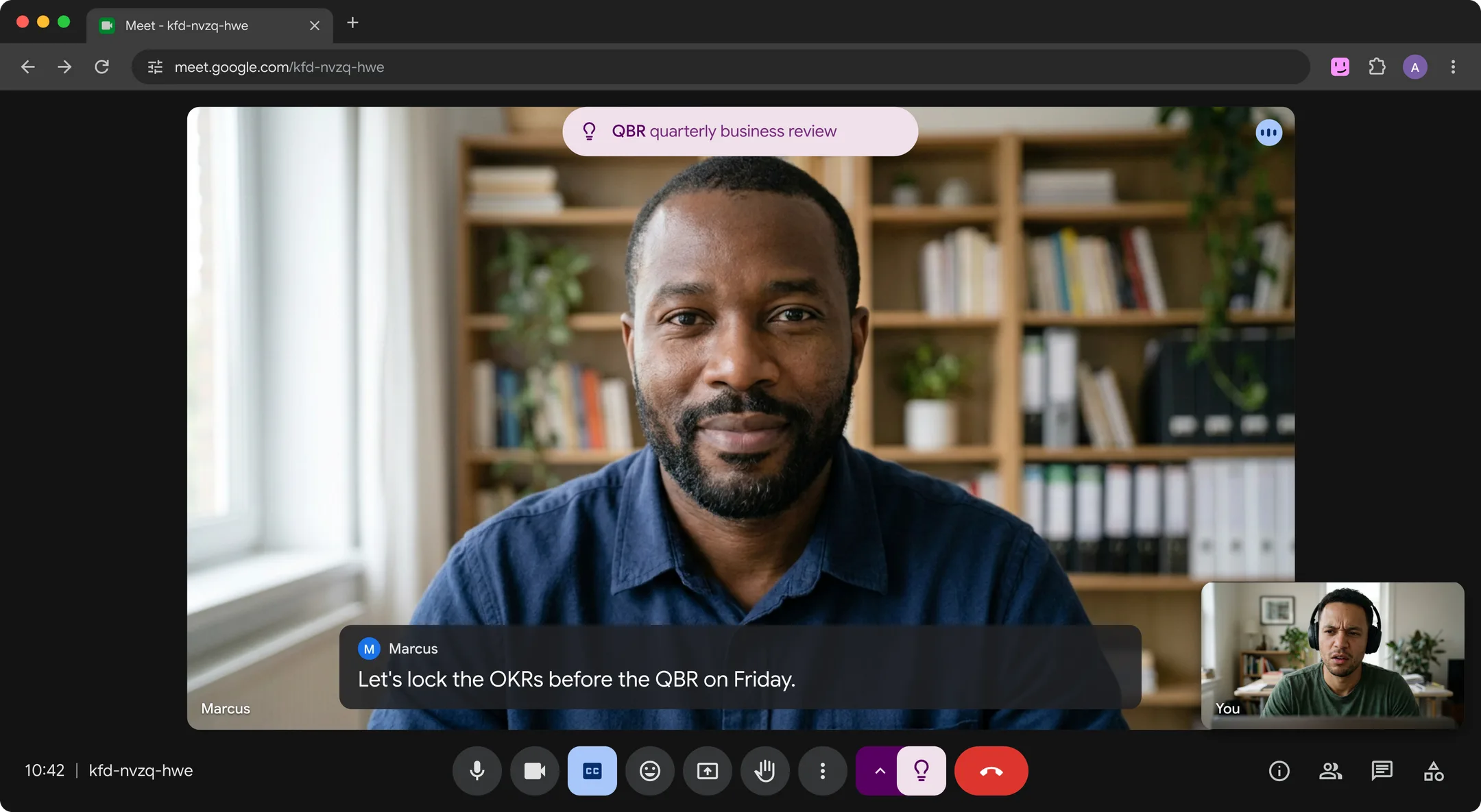
Hintly helps with one part of that: the named things you can't look up while you're listening. It adds a toggle beside Meet's Leave call button. Switch it on and it reads the call's live captions, then shows a small card near the top of the Meet tab a moment after something comes up: the term and a short explanation in English, with more detail when you hover.
Where it helps:
- Niche terms and acronyms, like QBR or a cap table (more in how to understand jargon in meetings).
- Named cultural references: a film, a TV show, a sports event or a famous person. If someone wants "a Moneyball approach", you'll usually get a card explaining Moneyball.
- Who's who. People, projects and clients mentioned earlier in the call come back as a reminder. That memory lasts for the call only.
- Asks aimed at you. When someone asks you to do something, a "For you" card shows the ask, so it's harder to miss in fast speech.
Where it doesn't:
- It doesn't translate. It's built for calls in English, and cards are in English.
- It won't reliably explain idioms, phrasal verbs or slang. That's why the table above is there.
- It doesn't fix speed or accents. If you're missing whole sentences, captions or translation will do more.
- No notes, transcripts or summaries. For a written record, ask for a recap or use a note taker.
- Google Meet in desktop Chrome only. Not Zoom, Teams, phone calls or in person.
- Hints are written by AI and can be wrong. Check anything that matters.
The cards appear only on your screen (sharing your entire screen, or a window showing Meet, shows them too), and they follow you into Meet's floating window when you switch tabs (see how to use Google Meet Picture-in-Picture). No bot joins the call, nothing is recorded, and Hintly's server doesn't store what's said. Caption text from everyone on the call is sent to Hintly's server and AI models to write the hints, so check your organization's policy on AI tools before using it on work calls.
FAQ
Does Hintly translate?
No. Hintly is built for calls in English, and its cards are in English. For translation in Google Meet, use translated captions or Speech Translation, which come with some paid Google plans (see when translation is the answer).
Will Hintly explain idioms?
Not reliably. It picks out named things: terms, acronyms, products, companies, people, places and events. A film or sports event usually gets a card. Idioms like "circle back", phrasal verbs and slang usually don't, which is why this page has a table of common ones.
Why are native English speakers harder to understand than non-native speakers?
Native speakers tend to talk faster, link words together, and use idioms and local references, and many don't adjust for a mixed audience. Non-native speakers usually speak more deliberately and use simpler phrasing.
How do I ask someone to slow down politely?
Keep it short and tie it to the content: "Could you go a little slower on this part? I want to get it right." Asking about one part feels less personal than commenting on how someone speaks.