
Best AI assistants for Google Meet
Last updated: October 23, 2026
Yes, Google Meet has an AI assistant: Gemini. On eligible plans, Gemini in Meet can take notes for you with Take notes for me and answer questions about the call with Ask Gemini. The catch is the plan. Google's May 2026 update lists Ask Gemini for Business Standard and Plus and Enterprise Standard and Plus, and Google's plan comparison adds the Google AI Pro for Education add-on. Take notes for me needs an eligible Workspace edition or Google AI plan, and it reached Google AI Pro and Ultra subscribers in June 2026, for meetings they host. A free personal Gmail account doesn't get either.
On a free account, or for something Gemini doesn't do, you'll need a third-party tool. Below are Gemini and six others: what each does during and after a call, which join as a bot, and what's free. For Gemini in depth, see Hintly vs Ask Gemini in Google Meet.
Two jobs an AI assistant can do in Meet
Most tools sold as a "Google Meet AI assistant" do one of two jobs:
- Help during the call. Something on your screen while people talk: a live transcript, answers when you ask, or short explanations of terms and names as they come up.
- Notes after the call. A summary, action items, a transcript or a recording that arrives when the meeting ends.
Almost every tool here is a note taker first, but a summary at 3:05 doesn't help when you got lost at 2:40. And getting lost is common: Benefit News, reporting on a 2024 Adobe Acrobat survey of over 1,000 US workers, says 45% admitted pretending to know an acronym rather than asking.
Disclosure: this page is published by Hintly. Details about other tools come from their own store listings, websites and help pages, checked in October 2026.
Quick comparison
| Assistant | During the call | After the call | Joins as a bot? | Free option |
|---|---|---|---|---|
| Hintly | Cards explaining terms, names and facts, only on your screen | Nothing: no notes or transcripts | No, Chrome extension | First 60 minutes of call time |
| Gemini in Google Meet | Ask Gemini answers questions you type | Notes in Google Docs and a recap email | No, built into Meet | No, needs an eligible paid plan |
| Tactiq | Live transcript and in-meeting AI | Summaries, action items, exports | No, Chrome extension | 10 transcripts and 5 AI credits a month |
| Otter | Live transcript and AI chat | Summaries, action items, search | Your choice: no-bot recording or its Notetaker | 300 minutes a month, 30 per conversation |
| Fireflies | Live Assist pane in the Chrome extension | Transcripts, summaries, AskFred | Usually, with a bot-free extension option | Free plan with limits |
| Fathom | Live summary in the Mac desktop app | Summaries, action items, clips | Yes, or bot-free on Mac | Unlimited recordings and transcripts |
| Read AI | Live notes and meeting metrics | Reports, summaries, coaching | Yes, or a botless Meet integration | A few meetings a month |
Top pick for help during the call
1. Hintly
Hintly is a Chrome extension for the first job: following a Google Meet call while it's happening. Turn it on with the toggle beside Meet's Leave call button. It reads the call's live captions, even when captions are hidden on your screen, and a moment after something is said, small cards appear near the top of the Meet tab.
Cards explain jargon, acronyms, technical and industry terms, niche products, notable people and lesser-known places. If someone describes a thing without naming it ("that yellow app with the ghost"), Hintly names it. If someone gets a fact clearly wrong, it shows the right answer. It also reminds you who's who, and shows a "For you" card when someone asks you to do something.
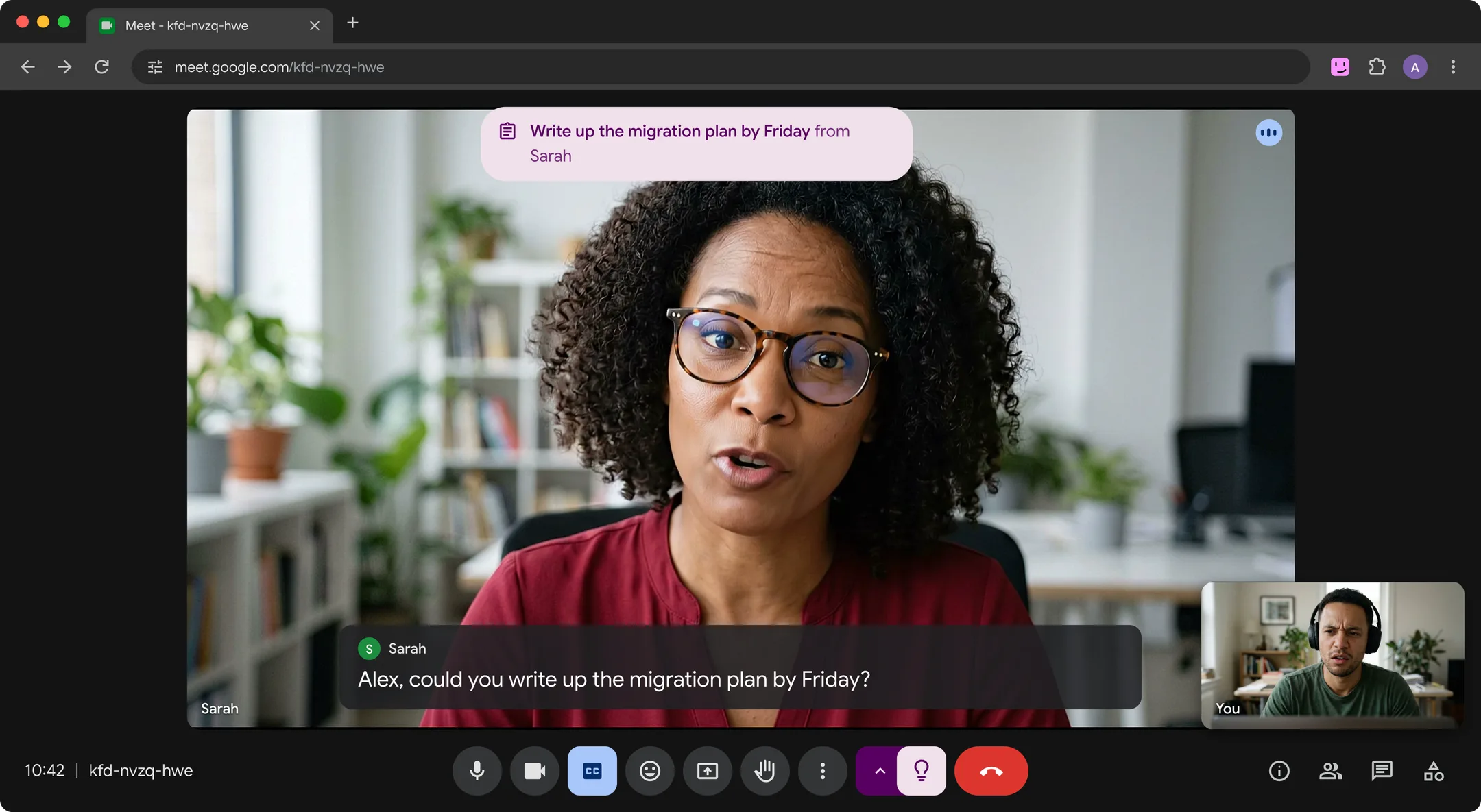
It skips what nearly every adult knows, like Excel or "stakeholders", so cards stay few. Hintly doesn't record audio, save transcripts or write summaries, so pair it with a note taker if you need a record. It's built for calls in English, doesn't translate, and like any AI it can be wrong. Your first 60 minutes of call time are free, no card needed. Pro is $12 a month for 50 hours of calls.
Key features
- Live explanations of jargon, acronyms, terms, products, people and places
- Names things people describe, and fact checks clear mistakes
- Reminders of who's who, plus "For you" cards when someone asks you for something
- Cards also show in Meet's Picture-in-Picture window
- No bot, no recording, and Hintly's server doesn't store what's said
Best for: anyone who wants to understand terms, names and facts during a Meet call, on any Google account, with cards that appear only on your screen.
Add to ChromeBuilt into Google Meet
2. Gemini in Google Meet
If your work account is on an eligible Workspace plan, Gemini is already in Meet, with nothing to install. It covers both jobs. Take notes for me writes notes to a Google Doc, emails the organizer a recap, and gives late joiners a summary so far. Ask Gemini answers questions you type during the call, like "catch me up", drawing on the meeting's live captions.
Ask Gemini answers when you ask. According to Google's help page, it starts once two people have joined, supports eight languages (one per meeting) and isn't available in breakout rooms. Participants see a notice when it's on, and admins and hosts can turn it off.
Key features
- Take notes for me: notes in Google Docs plus a recap email
- Ask Gemini: questions about the call so far, answered live
- Catch-up summaries for late joiners
- Nothing to install and no extra participant
Best for: teams already on an eligible Workspace business or enterprise plan who want notes and catch-ups without another tool.
Visit WebsiteTop pick for transcripts without a bot
3. Tactiq
Tactiq is a Chrome extension that transcribes Google Meet calls in your browser. No bot joins and no recording is needed: the transcript starts with the call and builds as people talk, with speaker labels and timestamps. Its in-meeting AI can summarize the call so far or answer a question about it.
When the call ends, it writes a summary and action items you can export to Google Docs, Notion, Word or PDF. It also works in Zoom and Teams. The free plan covers 10 transcripts and 5 AI credits a month, and paid plans are available.
Key features
- Live transcript with speaker labels and timestamps
- In-meeting AI for summaries and questions
- Summaries, action items and follow-up drafts after the call
- No bot in Meet, Zoom or Teams
Best for: people who want a full transcript and AI summary of Meet calls without inviting a bot.
View on Chrome Web Store4. Otter
Otter's Chrome extension works inside Google Meet. When you join a call, it asks whether to record on your device with no bot, or send Otter's AI Notetaker in as a normal participant. Either way, you see a live transcript and can use AI chat to ask things like "what's the deadline?" during the call.
Afterward you get a summary with action items. Otter's free Basic plan includes 300 transcription minutes a month with a 30-minute cap per conversation, which is tight for longer meetings.
Key features
- Live transcript in Meet, with a no-bot recording option
- AI chat during and after the meeting
- Summaries and action items after the call
- Optional AI Notetaker that joins as a participant
Best for: people who want a live transcript they can question, in Meet and elsewhere in Chrome.
View on Chrome Web Store5. Fireflies
Fireflies is a full note taker. Its Notetaker bot joins meetings when invited or through your auto-record settings, then sends notes, action items and summaries afterward, and you can ask its AskFred assistant about past meetings.
For Google Meet, the Fireflies Chrome extension adds Live Assist, a floating pane with live notes, the transcript, suggestions and AskFred answers. Fireflies describes it as bot-free, and it currently works only on Google Meet. AskFred questions use AI credits, and the free plan limits AI summaries, storage and credits.
Key features
- Notetaker bot for transcripts, summaries and action items
- Live Assist pane in Meet, without the bot
- AskFred questions about current and past calls
- Works with Zoom, Google Meet and Microsoft Teams
Best for: teams who want a full note taker with search and integrations, plus a live pane in Meet.
Visit WebsiteTop pick for free notes after the call
6. Fathom
Fathom records, transcribes and summarizes your calls. Its free plan includes unlimited recordings and transcriptions with instant AI summaries, which makes it the most generous free note taker here. Action items can flow into the tools your team uses.
Fathom captures meetings with a bot, or on Mac, its desktop app can capture calls without one (in beta) and show the summary building as the conversation goes. Bot-free capture isn't available on Windows yet.
Key features
- Unlimited recordings and transcriptions on the free plan
- AI summaries and action items right after the call
- Clips, playlists and search across calls
- Bot-free capture and live summaries in the Mac desktop app
Best for: people who want free, unlimited call notes and don't mind a bot, or who are on a Mac.
Visit Website7. Read AI
Read AI produces summaries, transcripts and meeting reports, including coaching metrics like talking speed and filler words. In Google Meet it can join as an assistant, or use a botless integration announced in March 2026 that doesn't take up a tile. Read says it notifies participants before recording starts so they can consent.
During the call, Live Notes and Metrics shows a running transcript, summary and meeting metrics. The free plan covers a small number of meetings and live sessions each month.
Key features
- Meeting reports with summaries and transcripts
- Live notes and metrics during the call
- Coaching on talking speed and filler words
- Assistant participant or botless Meet integration
Best for: people who want meeting reports and speaking feedback alongside their notes.
Visit WebsiteIs there a free AI assistant for Google Meet?
Yes, but "free" means something different for each tool. Here's what you get without paying, per each tool's own site in October 2026:
- Gemini in Google Meet: not free. It needs an eligible paid Workspace plan, or Google AI Pro or Ultra for Take notes for me.
- Hintly: the first 60 minutes of call time, no card needed. Then Pro is $12 a month for 50 hours of calls.
- Tactiq: 10 transcripts and 5 AI credits a month.
- Otter: 300 transcription minutes a month, up to 30 minutes per conversation.
- Fathom: unlimited recordings and transcriptions with AI summaries.
- Fireflies and Read AI: free plans with tighter limits on meetings, storage or AI credits.
For notes alone, Fathom's free plan goes furthest, and Tactiq is the free pick without a bot. For live help with terms and names, Hintly's free minutes cover a real meeting or two.
Which one should you pick?
- You need notes for the team: Fathom if a free plan matters most, Tactiq if you don't want a bot, Fireflies or Read AI for integrations and reports.
- You're already on an eligible Workspace plan: try Gemini first, since it's part of your plan.
- You want to understand terms and names live, on any Google account: Hintly.
- Your calls are on Zoom, Teams or in person: pick a note taker that covers those. Hintly works in Google Meet only.
It's fine to combine them: a note taker for the record, Hintly for the moment. If jargon is the main problem, see how to understand jargon in meetings. For live tools beyond Meet, see the best real-time AI meeting assistants, and for other add-ons, the best Google Meet Chrome extensions.
FAQ
Does Google Meet have a built-in AI assistant?
Yes. Gemini in Google Meet includes Take notes for me, which writes notes to a Google Doc, and Ask Gemini, which answers questions about the call as it happens. Both need an eligible plan, and free personal Gmail accounts don't include them. See Hintly vs Ask Gemini for the details.
Can an AI assistant join Google Meet without a bot?
Yes. Gemini is part of Meet itself. Hintly and Tactiq work in your browser, Otter's extension has a no-bot mode, and Fireflies' Live Assist runs in its extension without the bot. Fathom's Mac app and Read AI's botless integration also skip the bot. Tools that do use a bot add it to the call as a participant.
Will others know I'm using an AI assistant?
It depends on the tool. A note-taking bot appears in the participant list like anyone else. Gemini shows participants a notice when Take notes for me or Ask Gemini is on, and Read AI says it notifies participants before recording. With Hintly, no bot joins and the cards appear only on your screen, though if you share your entire screen, or a window showing Meet, others see the cards too. Whichever tool you use, what other people say is being processed by an AI service, so check your organization's policy first.
Does it work on free Gmail accounts?
Gemini in Meet doesn't, though Google AI Pro and Ultra add Take notes for me, for meetings you host. Hintly works on any Google account in desktop Chrome 116 or later, for calls in English, with the first 60 minutes free. The other tools here use their own sign-ups and free plans, separate from your Google plan.