
How to understand jargon in meetings without nodding along
Last updated: October 23, 2026
Someone mentions the DPA, three people nod, and the call moves on. You still don't know what a DPA is, and the longer the meeting runs, the harder it feels to ask.
This guide covers what to do in that moment: how to ask without derailing anything, quieter options for when you'd rather not speak up, and how to stop the same terms catching you out next week. The options run from the slowest answer to the fastest. This site belongs to Hintly, a Chrome extension for Google Meet, so the last section covers what it does and where it doesn't help.
You're not the only one nodding along
Jargon catches out almost everyone at some point. In a 2023 LinkedIn and Duolingo survey of more than 8,000 professionals in 8 countries, 60% said they have to figure out jargon on their own. Coverage of the same research reported that 54% of younger workers had secretly looked up a word in a meeting to keep up with the discussion.
Pretending is common too. According to Benefit News, in a 2024 Adobe Acrobat survey of over 1,000 Americans, 45% of employees admitted to pretending to know an acronym rather than asking what it meant.
So if a term just went over your head, the odds are good that someone else on the call missed it as well. A quick question often helps them as much as it helps you.
What to do in the moment
Pick whichever fits the meeting and how comfortable you feel. They're ordered from an answer after the call to an answer in a few seconds.
1. Note it and ask after
Write the term down exactly as you heard it, with a few words of context: "DPA, needed before the pilot, legal owns it". After the call, ask the person who said it, or a colleague, in a short message.
This costs you nothing in the meeting, but you follow the rest of the discussion with a gap. It works best when the term is a side detail rather than the point of the conversation.
2. Message a colleague
A direct message to someone you trust on the call is quiet and private: "What's DPA in this context?" Most people are glad to answer, because they remember being new to the jargon too.
You're relying on them noticing the message mid-call, so the answer might take a minute or two.
3. Ask in the meeting chat
Most video call apps have a chat panel. A short typed question lets the speaker answer at a natural pause without breaking their flow. "Quick question, what does DPA stand for?" is enough.
Anyone else who was wondering gets the answer too. The catch is that some presenters never look at the chat, so your question can sit there unanswered.
4. Ask out loud, briefly
This is usually the most reliable way to get the right answer, because the person who used the term knows exactly what they meant by it. Wait for a pause, keep it to one sentence, and skip the long apology. A few phrasings that work:
- "Quick one, what does DPA stand for here?"
- "Sorry, can you spell out DPA? I want to make sure I'm following."
- "When you say DPA, is that the data processing agreement?"
- "Can you define DPA for anyone newer to the project?"
- "Is DPA a general term, or something specific to this team?"
The third one, a guess phrased as a check, shows you were listening and only need a confirmation. The fourth frames the question as being for the group, which is often true. Whichever you use, ask the first time the term comes up. The longer you wait, the more it feels like you should already know.
5. Look it up quietly
A search in another tab gets you an answer in seconds, and for general industry terms it's usually right. There are two problems. You stop listening while you type and read, and acronyms often have several meanings. DPA could be a data processing agreement or a data protection authority, depending on who's talking.
Search the acronym together with a word from the conversation, such as "DPA contract", to narrow it down, then check the meaning fits the sentence you heard.
Industry jargon or internal team term?
Before you search, take a second to guess which kind of term you just heard, because only one kind is searchable.
- Industry jargon is shared across companies: a DPA, a cap table, a canary release. A search turns up a clear definition that most sources agree on.
- Internal terms belong to one company or team: project codenames, names for in-house tools, nicknames for recurring meetings, and acronyms someone made up for a process years ago.
A few signs that a term is internal: it's said like a name ("Falcon is slipping again"), a search returns nothing useful or a dozen unrelated meanings, and only people from your company seem to use it.
Internal terms need a person, not a search. The meaning lives in someone's head or a doc on your intranet, and a search engine or AI tool can only guess. A confident wrong guess is worse than no answer, so for these, use one of the asking options above.
After the meeting
The few minutes after a call are the best time to close the gaps. Go through the terms you noted, look up the industry ones, and send one message with the internal ones batched together: "Two quick ones from the planning call: what's Falcon, and what goes in the T2 queue?" One message is easier on a colleague than five separate interruptions.
Keep the answers somewhere you'll see them again, with the sentence you heard each term in. If you're new to a role and the terms keep coming, there's a longer plan for your first month in how to keep up with acronyms at work.
If you run the meeting
Most jargon in meetings isn't deliberate. It's shorthand that stopped feeling like shorthand. A few habits make your meetings easier to follow:
- Define a term the first time it comes up. "The DPA, the data processing agreement, needs signing first" takes three extra seconds.
- Put a short glossary in the agenda when the meeting includes new joiners, other teams or clients. Three or four lines is enough.
- Invite questions up front. "Stop me if I use a term that isn't obvious" makes asking feel normal rather than like an admission.
- Explain codenames. Anything invented inside the team needs a one-line explanation for anyone outside it.
- Check the chat at pauses, so people learn that typed questions get picked up.
Get explanations live in Google Meet
Hintly is the Chrome extension this site is for. It adds a toggle beside Meet's Leave call button. Switch it on and it reads the call's live captions, then shows a small card near the top of the Meet tab a moment after a term comes up: the term and a short explanation, with more detail when you hover. You don't type anything or look away from the call.
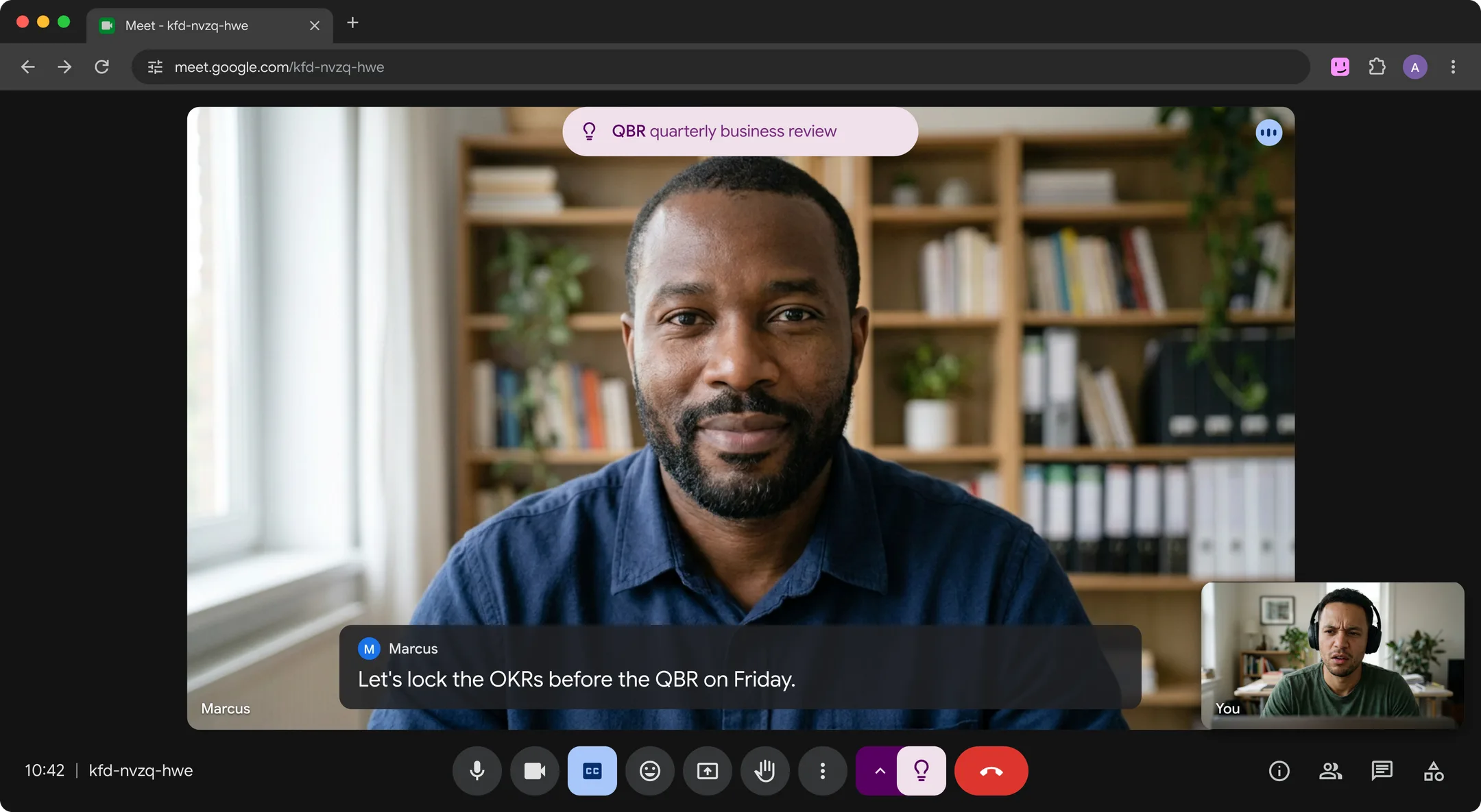
It covers more than acronyms: technical and industry terms, niche products and companies, people mentioned earlier in the call, and things people describe without naming. Cards also show in Meet's floating window, so they follow you if you switch tabs (see how to use Google Meet Picture-in-Picture). The cards appear only on your screen, so others see them only if you share your entire screen or a window showing Meet. No bot joins the call, nothing is recorded, and Hintly's server doesn't store what's said.
Where it falls short:
- Google Meet only, in desktop Chrome. On Zoom, Teams, phone calls or in person, the options above are what you have.
- Built for calls in English. It doesn't translate.
- It skips the basics. Everyday business words like Q3, stakeholders or sprint don't get a card, so it stays quiet for the easy stuff.
- It doesn't know your company's codenames unless someone on the call explains them. Internal terms still need a person.
- Hints are written by AI and can be wrong. If a term matters for a decision, confirm it.
To write hints, caption text from the call is sent to Hintly's server and AI models, so check your organization's policy on AI tools before using it on work calls. If your account has Gemini in Meet, see Hintly vs Ask Gemini in Google Meet for how the two differ.
Common questions
Is it OK to ask what an acronym means in a meeting?
Yes. A quick, specific question is normal in most workplaces, and acronyms are often unclear to more people than the speaker realizes. Asking can also head off a misunderstanding that would cost more time later. Keep it short and ask early.
How do I ask without looking like I wasn't listening?
Show what you did catch. Repeat the point back and attach the question: "So legal needs the DPA before the pilot, and DPA here is the data processing agreement?" A guess framed as a check reads as attention, not confusion. Asking the first time a term appears also helps, since it's clearly new rather than something you drifted past.
What if it's an internal company term?
Ask a person. Codenames and team shorthand rarely appear online, so search engines and AI tools can only guess. Ask whoever used it, a teammate, or check whether your team keeps a glossary. If it doesn't, starting one is a favor to everyone who joins after you.