
How to use ChatGPT in Google Meet
Last updated: October 23, 2026
ChatGPT isn't built into Google Meet, and it doesn't join calls itself. OpenAI's meeting features listen on your own computer instead, and only on a Mac. You can still get AI help with a Meet call: let ChatGPT record it, give ChatGPT or Claude a transcript afterwards, or use a tool that brings AI into the call. The right one depends on what you want.
Disclosure: this page is published by Hintly. Details about other tools come from their own store listings, websites and help pages, checked in October 2026.
What do you want ChatGPT to do in the call?
- Take notes and summarize a call: record it with ChatGPT on a Mac, or give ChatGPT or Claude a transcript after the call.
- Ask about what was said while the call is still going: Tactiq, or Ask Gemini if your Workspace plan includes it.
- Get a quick answer to a question you type: keep ChatGPT open in a side window.
- Prompt AI as a group, with answers everyone sees: a Meet add-on such as Athena AI.
- Understand terms, names and acronyms as they come up, without typing: Hintly.
Record a Google Meet call with ChatGPT on a Mac
ChatGPT's Record feature is the closest thing to ChatGPT in Google Meet from OpenAI itself. It runs in the ChatGPT desktop app for macOS and listens through your Mac's microphone and system audio, so it hears everyone on the call. Nothing is added to the meeting. When you stop, ChatGPT turns the transcript into notes, saved as a canvas in your chat.
OpenAI's help page lists Record for the Plus, Pro, Business, Enterprise and Edu plans, in the Mac app only. Free accounts don't get it. Plus is $20 a month on ChatGPT's pricing page. OpenAI describes Record as part of its older Mac app, now called ChatGPT Classic, and users report the Record button is missing from the newer ChatGPT app for Mac.
- Open the ChatGPT app for Mac that shows Record (ChatGPT Classic, if the newer app doesn't) and sign in on an eligible plan.
- Join your Google Meet call in your browser as usual.
- In the ChatGPT app, click Record at the bottom of a chat. If asked, allow ChatGPT under Microphone and Screen & System Audio Recording in macOS System Settings.
- Watch the live transcript build as people talk.
- When the call ends, stop and send the recording. Your notes open as a canvas, and you can ask follow-up questions in the same chat.
- Mac only. No Record on Windows, the web or phones.
- Four hours per session, the current cap on OpenAI's help page.
- Consent is up to you. OpenAI reminds you to get it before recording people.
With Google Calendar connected, OpenAI says Record can also pick up upcoming meetings that have a Google Meet link. Pro and Business plans get a newer Meetings plugin, in beta on Mac, that adds a summary and suggested action items.
Give ChatGPT or Claude a transcript after the call
This works on any computer, with a free ChatGPT or Claude account. Two common ways to get a transcript:
- Meet's own transcripts. On eligible Workspace plans, such as Business Standard, Business Plus and the Enterprise plans, click Meeting tools > Transcribe > Start transcription. Google says the transcript is saved to the organizer's Google Drive and emailed to the host afterwards. Everyone sees a transcript icon.
- Tactiq. On a free personal account, or when you can't turn on Meet's transcripts, Tactiq's Chrome extension transcribes the call in your browser.
Copy the text or download the file, paste or upload it into ChatGPT or Claude, and ask: "List the decisions and action items with owners", "Explain the technical terms in plain English" or "What did Priya say about the launch date?"
Claude doesn't join Meet calls; give it a transcript afterwards. Tactiq also offers a connector for Claude that it says works in ChatGPT too, so you can search past calls without pasting. Reading full transcripts that way needs a Tactiq Team plan or higher.
The catch is timing: a transcript helps after the meeting, not at the moment you got lost.
Use Tactiq for a live transcript with AI
Tactiq is a Chrome extension that transcribes Google Meet calls in your browser, with speaker labels and timestamps. No bot joins and no recording is needed. During the call, its Ask Tactiq AI tab answers questions like "What are the key points so far?" on free and paid plans. Afterwards it writes a summary and action items you can export.
It's the nearest thing to a ChatGPT extension for Google Meet: its listing says it's powered by models from OpenAI and Anthropic, the companies behind ChatGPT and Claude. It also works in Zoom and Teams. The free plan covers 10 transcripts and 5 AI credits a month, and paid plans are available.
View on Chrome Web StoreAsk ChatGPT in a side window
The simplest option is to keep ChatGPT open next to the call and type a question when something comes up, like "What's a CRDT?" OpenAI's ChatGPT extension for Chrome adds a side chat beside the tab you're on. It doesn't hear the call, though, so you have to catch the word and type it, and while you type you're not listening.
Share AI answers with everyone: Athena AI
Athena AI is a Google Meet add-on from Devfortress. Its Marketplace address still uses an older name, ChatGPT AI for Meetings. Anyone in the call can type a prompt, and the answer is shown to the whole group in real time, which suits brainstorming and drafting together. The listing doesn't say which AI model it uses, and it's listed as free of charge.
To try it, open the tools panel at the bottom right of a Meet call, search the Workspace Marketplace for Athena AI and install it. Others need it installed to take part. Because everyone sees the answers, it's for group work, not quiet help, and admins and hosts can restrict add-ons.
View on Workspace MarketplaceUse Ask Gemini, the built-in option
On an eligible Workspace plan, Google's own version is Ask Gemini in Meet. Type "catch me up" or "what was decided about pricing?" and Gemini answers from the meeting's captions, your Workspace files and Google Search. Only you see your questions, but everyone sees a banner when it's on. It needs an eligible paid Workspace plan, such as Business Standard or Plus, and Google's plan lists don't include free Gmail accounts. See Hintly vs Ask Gemini in Google Meet.
Get explanations without asking: Hintly
Every option above waits for you to ask, or helps once the call is over. Hintly works the other way. It's a Chrome extension for Google Meet in desktop Chrome, and it isn't a chatbot: it doesn't take questions. Switch it on with the toggle beside Meet's Leave call button, and it reads the call's live captions, even when they're hidden on your screen. A moment after something is said, a small card appears near the top of the Meet tab with the term and a short explanation.
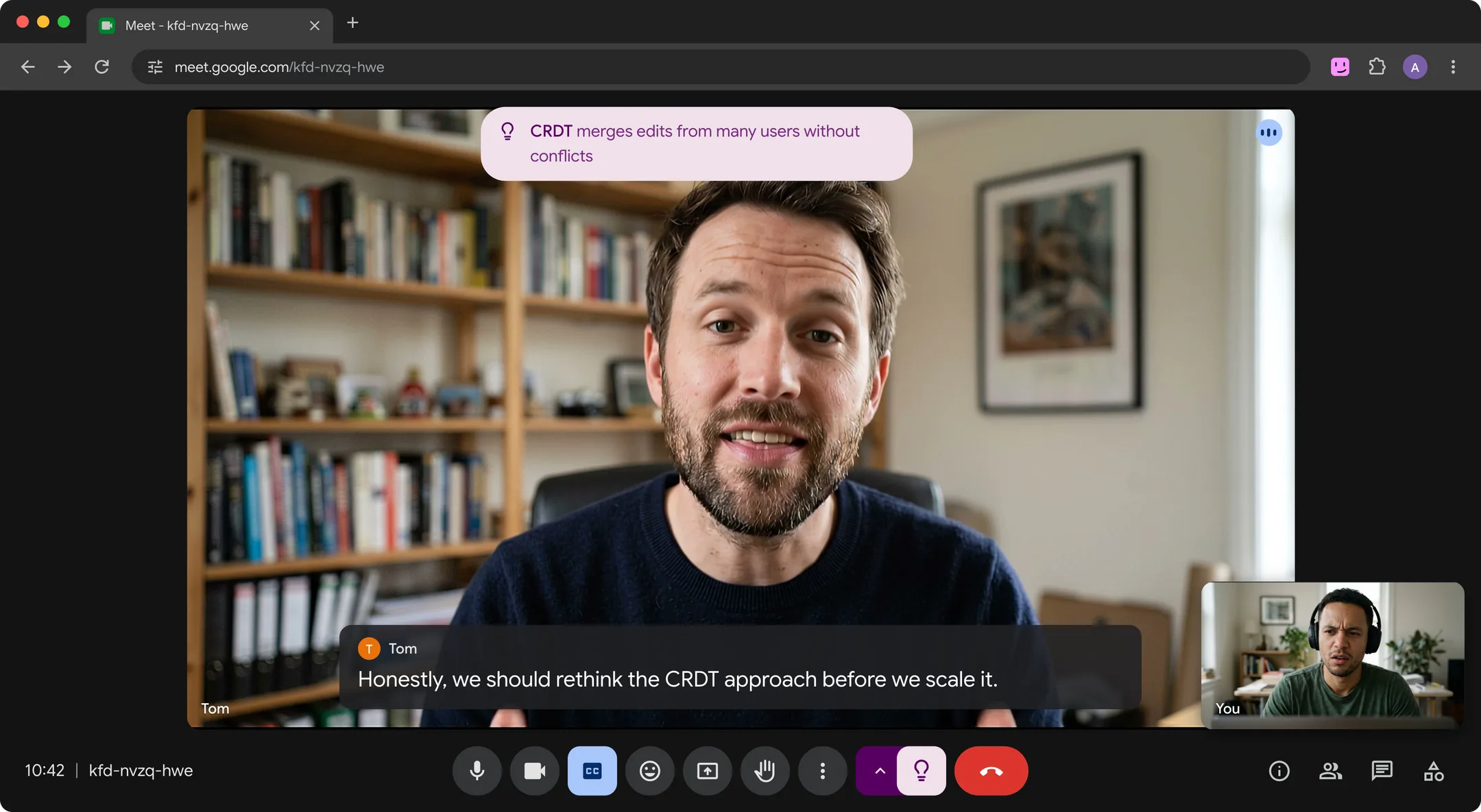
Cards cover jargon, acronyms, technical terms, niche products, notable people and lesser-known places. Hintly also names things people describe, shows the right answer when a fact is clearly wrong, reminds you who's who from earlier in the call, and flags when someone asks you to do something. It skips what nearly every adult knows, like Excel or Q3. More in how to understand jargon in meetings.
- The cards appear only on your screen. No bot, no recording, and Hintly's server doesn't store what's said. If you share your entire screen, or a window showing Meet, others see the cards too.
- No notes. Pair it with a transcript option if you need a record.
- Built for calls in English, on Google Meet in desktop Chrome 116 or later. No translation, and AI can be wrong.
- Price. The first 60 minutes of call time are free, no card needed. Pro is $12 a month for 50 hours.
Compare the options
| Method | During the call | After the call | Who sees it | Cost to start |
|---|---|---|---|---|
| ChatGPT Record | Live transcript in the Mac app | Notes and a summary | Only you. Nothing is added to the call. | ChatGPT Plus ($20 a month) or higher, on a Mac |
| Transcript into ChatGPT or Claude | Nothing | Summaries, action items, answers | Only you | Free account, plus a transcript |
| Tactiq | Live transcript and answers to questions you type | Summary, action items, exports | Only you, unless you share. No bot. | Free plan: 10 transcripts and 5 AI credits a month |
| ChatGPT in a side window | Answers to questions you type | Nothing | Only you | Free account |
| Athena AI | Answers to prompts from anyone in the call | Notes and action items, per its listing | Everyone in the call | Listed as free of charge |
| Ask Gemini in Meet | Answers to questions you type | Notes through Take notes for me | Only you see answers. Everyone sees a banner. | Eligible paid Workspace plan |
| Hintly | Cards explaining terms, names and facts as they come up | Nothing: no notes | Only on your screen. No bot joins. | First 60 minutes of call time free |
Combining them is fine: a transcript for the record, Hintly for the moment. For more tools, see the best AI assistants for Google Meet, or how to use Copilot in Google Meet.
Privacy: what gets sent where
Every option here sends what people say to an AI company:
- ChatGPT Record: audio goes to OpenAI and is deleted after transcription. On Plus and Pro, transcripts and notes may train models if "Improve the model for everyone" is on. Business, Enterprise and Edu content is excluded by default.
- A pasted transcript: the whole conversation goes to OpenAI or Anthropic. Both have a setting for personal accounts that controls whether chats are used for training.
- Tactiq: stores your transcripts, private by default, and says it doesn't train models on your content.
- Athena AI: prompts and answers are visible to everyone in the call.
- Hintly: while on, caption text goes to Hintly's server and AI models to write hints. The server doesn't store it, and nothing is sent while the toggle is off.
Your workplace may restrict which AI tools can process meetings, especially client calls. Check your organization's policy first, and tell people before you record them.
FAQ
Is there a ChatGPT extension for Google Meet?
Not one made for Meet by OpenAI. OpenAI's ChatGPT extension for Chrome adds a side chat that can use the page you're on as context, but its documentation doesn't mention Google Meet or calls. The closest is Tactiq, which uses OpenAI and Anthropic models. Many extensions with "ChatGPT" in the name aren't from OpenAI, so check the publisher before installing. See the best Google Meet Chrome extensions.
Can ChatGPT join a Google Meet call?
No. ChatGPT doesn't join calls as a participant. Record and the newer Meetings plugin listen through your Mac's microphone and system audio instead, and OpenAI describes Meetings as working "without a bot joining the call." On Windows, use a transcript or a browser extension.
Can I use Claude in Google Meet?
Not inside the call. Claude doesn't join Meet calls; give it a transcript afterwards and ask for a summary, action items or plain-English explanations. With Tactiq's Claude connector, Claude can search your past calls without pasting.
Will others know?
It depends. Meet's transcripts show everyone an icon, Ask Gemini shows a banner, and Athena AI's answers appear for the whole group. ChatGPT Record and Tactiq add nothing to the call, and OpenAI says its Meetings plugin doesn't notify other participants or get their consent for you. With Hintly, no bot joins and the cards appear only on your screen, though sharing your entire screen, or a window showing Meet, shows them too. Either way, an AI is processing what other people say, so check your organization's policy.